

Have you noticed your Roadrunner email is archived or lost? This happens when your email is inactive for 90 to 180 days. Spectrum, the new managing company for Roadrunner email since 2016, ensures that accounts not active for more than 6 months are deactivated for security reasons. That’s why your Roadrunner email is not working at all. Before you get frustrated, you can unarchive your email and start using it with this guide. So, read on.
Quick Answer: How to Reactivate Archived Roadrunner Email in 2026
To reactivate an archived Roadrunner account (managed by Spectrum), first attempt login at webmail.spectrum.net using your full @rr.com address and password on a desktop browser. If inactive due to dormancy, this may restore web access, but contact Spectrum support at 1-855-707-7328 to confirm reactivation and IMAP sync—no verified “server-side handshake”.
Key Takeaways: Why Your Roadrunner Email is Missing
Causes Behind Roadrunner Archived email
- Inactive for 180 days or more
- Suspicious login activity
- Not linked to a Spectrum ID
- Cancelled Spectrum internet service
Fixes:
- Reset your password at webmail.spectrum.net
- Relink your Roadrunner email to your Spectrum ID
- Use the correct portal — webmail.spectrum.net only
- Update IMAP settings to mail.twc.com (Port 993) and SMTP (Port 587)
- Resync your email app by removing and re-adding the account
How to prevent:
- Log in at webmail.spectrum.net every 90 days
- Keep your Roadrunner email linked to your Spectrum ID
- Update your recovery phone number and backup email
What Happened to Roadrunner Email? (The Spectrum Merger)
Roadrunner Email is a free email service from Time Warner Cable. It came with their internet plan and assigned users addresses such as @rr.com or @roadrunner.com. In 2016, Time Warner Cable was taken over by Spectrum, which now manages all Roadrunner email accounts.
The problem is, Spectrum archives your Roadrunner email if you don’t use it for 180 days. Once archived, you lose access to all your emails and contacts.
Supported Legacy Domains: @rr.com, TWC, and Brighthouse
Since the 2025 Spectrum migration, all regional “Roadrunner” domains have been unified. If your email ends in any of the following, the troubleshooting steps in this guide will work for you.
| Region | Legacy Domains ( Managed by Spectrum in 2026) |
| New York / Northeast | @nyc.rr.com, @twcny.rr.com, @rochester.rr.com, @nycap.rr.com |
| Florida / South | @tampabay.rr.com, @cfl.rr.com, @brighthouse.com |
| California / West | @socal.rr.com, @bak.rr.com, @san.rr.com |
| Texas / Central | @austin.rr.com, @satx.rr.com, @tx.rr.com, @kc.rr.com |
| Carolinas | @nc.rr.com, @sc.rr.com, @carolina.rr.com |
| Midwest / Ohio | @wi.rr.com, @neo.rr.com, @cinci.rr.com, @mi.rr.com |
(Problems): Why Is Roadrunner Email is Archived
Explore the reasons your Roadrunner email is pushed to the archive or lost:
1. Prolonged Inactivity:
The Roadrunner account can be lost or suspended if it’s not active within 6 months of the last usage. The officials, Spectrum, do that for safety purposes. The account needs to be active to remain unarchived.
2. Account triggered as suspicious:
Your account may be suspended because you’re found to be involved in suspicious activities. Another cause could be that multiple login attempts triggered the archiving of the account to protect your data.
3. Legacy Migration:
Another cause could be that your old email is not connected to the new Spectrum ID, which is mandatory after the merger happened between Spectrum and Roadrunner. Because it’s not linked to an active account, the system automatically marks it as “Archived.”
If you are getting a “User Not Found” error, you likely have an [Orphaned Roadrunner Account] that needs a Spectrum ID handshake.
4. Discontinue Spectrum Internet Service:
If you cancel Spectrum internet, they deactivate the old Roadrunner (@rr.com or roadrunner.com). The reason is that it’s not connected to the paid subscription.
(Solutions): Fixes of Archived Roadrunner Email Error
Follow the quick solution guide to get your Roadrunner email back when it’s not working due to being archived.
1. Reset Your Spectrum/Roadrunner Password:
- Visit the official Spectrum sign-in page.
- Select “Forgot Username or Password?” under the blue Sign In button.
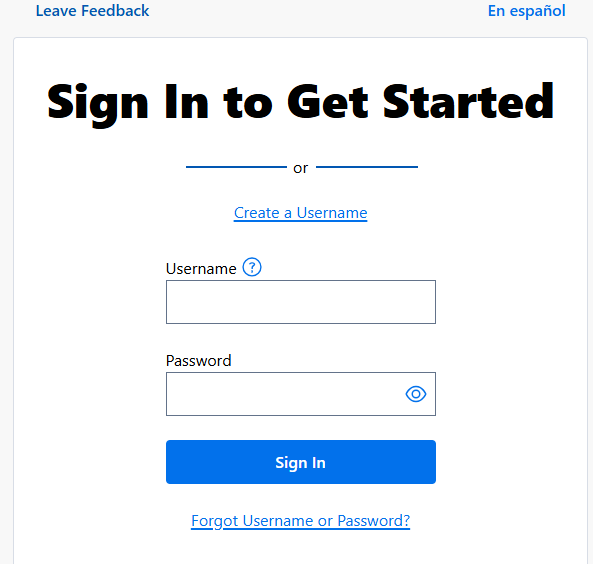
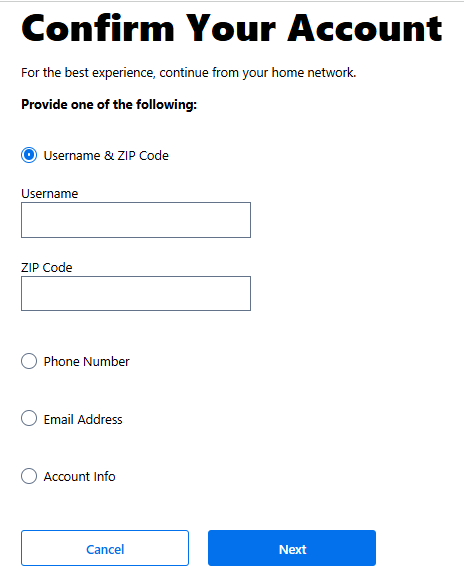
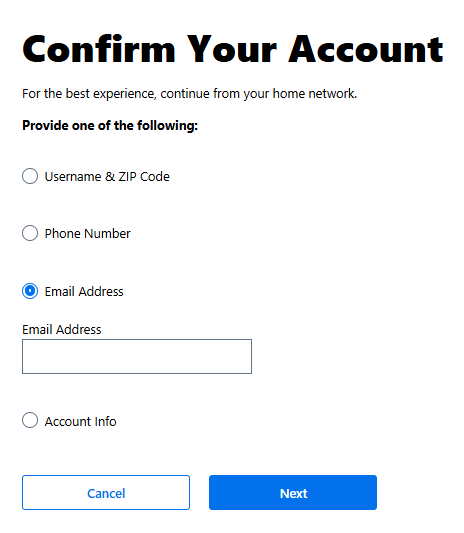
- Now, select one of the options and enter the details. For example:
If you select Username & ZIP Code:
- Enter the username of roadrunner email and ZIP Code.
- Confirm you’re not a robot.
- Then, verify the information by receiving a confirmation code via text message, phone call, or email.
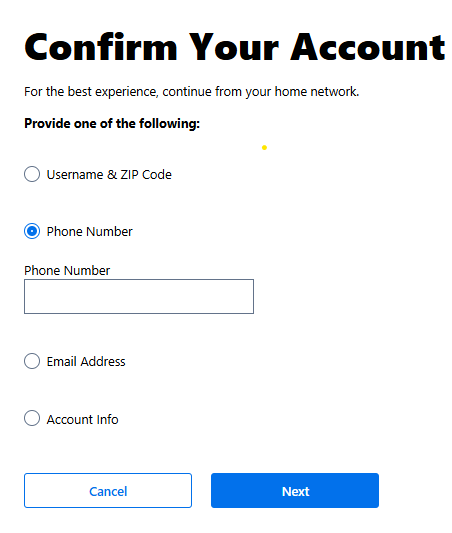
If you select Phone Number:
- Enter the number
- Confirm you’re human.
- Receive and enter the verification code.
- And confirm the same.
If you choose email:
- Select your email address
- Confirm you’re not robot
- Verify identity by entering the verification code.
Note: Perform the reset on a desktop browser. Resetting through a phone app (like Mail or Outlook) often fails to sync the “un-archive” command back to Spectrum’s servers.
After you access your account using any of the ways, consider changing the password.
2. Link Your Email to a Valid Spectrum ID:
- Visit spectrum.net
- Select “Forgot Username/Password?”
- Enter your Roadrunner email (usually ending with @rr.com) and associated phone number; request reset code via text/call.
- Use the temp password provided (via support if needed) to log in at selfcare.rr.com
- Update password under “Contact Info” > ellipsis > “Update Password.”.
3. Use the Official Webmail Portal (webmail.spectrum.net)
If you try to access your Roadrunner email on the traditional portals like roadrunner.com or twc.com, you will fail to find the email. Instead, select a correct portal.
Use the official unified login portal for all legacy domains, which is: webmail.spectrum.net.
4. Update IMAP/SMTP Server Settings
If you use Roadrunner email in the app or Outlook, outdated server settings may be causing it to fail.
To fix that,
Update your incoming and outgoing servers.
Simply go to your Mail App Settings and enter these exact details:
| Setting Type | Incoming Server (IMAP) | Outgoing Server (SMTP) |
| Server Address | mail.twc.com | mail.twc.com |
| Port Number | 993 | 587 |
| Encryption/Security | SSL/TLS (ON) | STARTTLS (ON) |
Note: if you’ve still pop.roadrunner.com or mobile.charter.net saved on your phone, you cannot access your email because Spectrum has retired these old addresses. So, switch to the modern address: mail.twc.com.
5. App-Specific Resync
Even after updating the server settings, your email app might still not sync properly. That’s because the app is still holding onto old, broken connection data. You need to force it to start fresh.
iPhone iPad:
- Visit Settings
- Tap Mail section.
- Tap Accounts.
- Click your Roadrunner account.
- Push the toggle on Mail switch off. Wait for 10 seconds, and toggle it on again.
- This forces the app to re-establish a clean connection with Spectrum’s server.
On Outlook (Desktop):
- Go to File
- Tap Account Settings
- Remove the Roadrunner account completely
- Re-add it as a new IMAP account using mail.twc.com
What Happens to Your Emails When Roadrunner is Archived?
Most people assume that when their Roadrunner email gets archived, their emails are simply hidden.
The reality is much worse.
The moment Spectrum archives your account:
- Your inbox becomes inaccessible
- Emails sent to your address bounce back to the sender
- Every connected app (iPhone, Outlook, Thunderbird) throws an authentication error.
From the outside, it looks like your email address no longer exists.
How to Prevent Your Roadrunner Email from Being Archived Again
Getting your archived Roadrunner email fixed is only half the battle. Here’s how to make sure it never happens again:
- Log In Directly Every 90 Days Spectrum deactivates Roadrunner accounts after inactivity. After 30–180 days of inactivity, Spectrum may deactivate the account entirely. To stay safe, log in directly at webmail.spectrum.net at least once every 90 days. Opening emails through an app alone does not always count as active usage on Spectrum’s servers.
- Link Your Roadrunner Email to Your Spectrum ID In October 2025, Spectrum completed an email transition where “orphaned” email accounts — addresses not associated with an active Spectrum account — were permanently deleted with no recovery option.To avoid this, go to spectrum.net → Settings → People and confirm your Roadrunner address is listed. If it’s missing, add it immediately using the “Add User” option.
- Keep Your Recovery Info Current Make sure your linked phone number and backup email in your Spectrum account are active and up to date. These are the only ways to verify your identity if you get locked out. An outdated phone number means permanent loss of access.
- Set Up Email Forwarding to Gmail or Outlook Forward all incoming Roadrunner emails to a modern inbox like Gmail or Outlook. This keeps your communication uninterrupted even if your Roadrunner account runs into issues, and automatically creates a backup of every incoming message.
- Back Up Your Emails Now: Spectrum has confirmed that you will continue to have access to your email for 60 days from the date you disconnect from Spectrum internet service — after that, the account expires and cannot be recovered.
Don’t wait for that deadline. Export your emails now. Thunderbird can save them as MBOX files and Outlook saves them as PST files.
- Think Long-Term As of late 2025, the legacy Roadrunner accounts are being merged into Spectrum’s unified platform, no new addresses are being issued, and users who cancel Spectrum internet typically lose email access within 60–90 days.If you rely on your Roadrunner email for important accounts, banking, or business, start migrating to Gmail or Outlook now, and use Roadrunner only as a forwarding address.
Conclusion
Roadrunner email is archived mainly due to prolonged inactivity, account migration issues, or cancellation of Spectrum internet service. By logging into webmail.spectrum.net at least every 60 to 90 days, linking your email to your Spectrum ID, and keeping recovery information up to date, you can avoid losing access permanently.
Since legacy Roadrunner accounts are being phased out, we strongly recommend backing up your email and migrating to Gmail or Outlook sooner. If you need more help, visit Spectrum’s official email support.
Frequently Asked Questions
Q1: Can I still create a new Roadrunner email account? No. New Roadrunner email accounts cannot be created — you can only access existing Roadrunner, TWC, or RR webmail accounts through Spectrum services.
Q2: Will Spectrum eventually shut down Roadrunner email for good?
There is no official shutdown date yet, but Roadrunner accounts are gradually being merged into Spectrum’s unified platform. No new addresses are being created, and users who cancel Spectrum internet lose email access within 60–90 days. It is best to back up your emails now and consider migrating to Gmail or Outlook.
Q3: Why does my Roadrunner email work on my phone but not on my laptop?
The most common reason is outdated server settings. Make sure your app is using mail.twc.com for both incoming (IMAP, port 993) and outgoing (SMTP, port 587) servers. Old addresses like pop.roadrunner.com or mobile.charter.net no longer work as Spectrum has retired them.
Q4: I reset my password but I’m still locked out of Outlook. Why?
Even after a password reset, your email app may still hold onto old connection data. Try removing your Roadrunner account from the app completely and re-adding it as a fresh IMAP account using mail.twc.com. This forces the app to reconnect properly with Spectrum’s servers
Q5: Does Spectrum charge extra to keep a Roadrunner email address? No separate email fee is charged, but an active Spectrum internet subscription is generally required to maintain access. If you cancel your Spectrum service, your Roadrunner email will be deactivated.
Q6: Is it safe to keep using Roadrunner email in 2026? It works, but comes with risks: limited official support, compatibility issues with newer email clients, and no guarantee of long-term service. For mission-critical communication, consider migrating to Gmail or Outlook and setting up Roadrunner as a forwarding address only.