
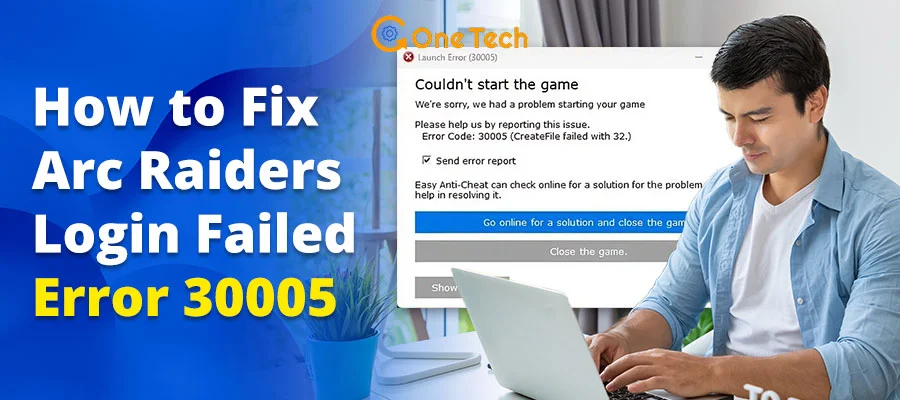
If Arc Raiders shows “Login failed due to service interruption” plus Easy Anti‑Cheat Error 30005 on PC, this guide walks you through the steps to fix it.
This error usually isn’t a server outage; it’s a local file or driver conflict on your PC that stops Easy Anti‑Cheat from starting when you launch Arc Raiders.
What Does “EAC Error 30005” Actually Mean?
When you see the specific “CreateFile failed with 32” status, your Windows system is telling you that the Easy Anti‑Cheat driver (usually EasyAntiCheat.sys) is locked by another process or service. In the context of Arc Raiders, this typically happens when the game client tries to launch a new kernel-level handshake while a “zombie” instance of the driver is still hanging in your system memory from a previous session or a crash.
In technical terms, the game is trying to start the Easy Anti‑Cheat driver, but the driver is still held open by a previous or crashed session. Without this driver initialisation, Embark Studios’ servers block the login until EAC is ready, so the error message appears as a “service interruption” even though the root cause is on your PC.
Note: Easy Anti‑Cheat is a third‑party anti‑cheat service; changes to its files are controlled by the game and its launcher. If you can’t delete EasyAntiCheat.sys because it’s “in use”, restart your PC first, then try again before continuing with further steps.
Quick 60-Second Diagnosis Checklist
Before running deeper system tools, first run through this quick triage checklist to see if your fix is simpler than it looks:
- Check Official Status: Visit @ArcRaidersGame on X to ensure there isn’t a massive 2026 regional outage.
- Restart Your Launcher: Completely exit Steam or the Epic Games Store and restart it as Administrator.
- Locate the .sys File: Navigate to your C:\Program Files (x86)\EasyAntiCheat folder to see if EasyAntiCheat.sys is present.
- Kill RGB Bloatware: Software like iCUE, Razer Synapse, or NZXT Cam often triggers EAC false positives. Close them via Task Manager.
- Verify Device Security: Ensure Windows “Core Isolation” hasn’t recently been updated to block the EAC driver.
Why EAC Fails in Arc Raiders (Top Causes)
Community and technical troubleshooting reports have identified three common causes of this error in the 2026 build of the game:
- The “Zombie” Process: If Arc Raiders crashed during your last extraction, the EAC service might still think the game is running. When you try to re-launch, it fails to create a new instance of the driver.
- Antivirus Overreach: With 2026’s hyper-aggressive AI-driven antivirus heuristics, the “heartbeat” signal sent by EAC is frequently flagged as a rootkit, leading to an instant file lock.
- Kernel-Mode Conflicts: Recent Windows 11 updates have introduced stricter Hardware-enforced Stack Protection, which can conflict with how older versions of EAC interact with your CPU.
Step-by-Step Fixes for Error 30005
Important safety note: Editing system drivers can affect how your PC runs. Always back up important data before making changes, and stop if you see any warning messages you don’t understand. If the error persists, consider reinstalling Arc Raiders or contacting Embark support.
If you’re not comfortable editing system files, or the error persists after these steps, consider reinstalling Arc Raiders or contacting Embark support instead of forcing deeper system changes.
Method 1: The Manual Driver Reset (The #1 Fix)
This is a commonly effective fix that many players have reported helping with Error 30005. By deleting the temporary driver file, you force the game to generate a fresh, unlocked version.
- Navigate to the folder: C:\Program Files (x86)\EasyAntiCheat.
- Locate the file EasyAntiCheat.sys.
- Delete it. (Don’t worry, the game will recreate it safely).
- Restart Arc Raiders.
Method 2: Using the EAC Setup Executable
Sometimes the service itself is corrupted rather than just a single file. You can trigger a Repair directly through the game files.
- Right-click Arc Raiders in your library > Manage > Browse Local Files.
- Open the EasyAntiCheat folder.
- Run EasyAntiCheat_Setup.exe as Administrator.
- Select Arc Raiders from the dropdown and click Repair Service.
Method 3: Multimedia Guide
If you prefer a visual walkthrough of the process, we’ve curated this high-impact tutorial on managing EAC errors in modern extraction shooters:
EAC Error 30005: Symptoms and Fixes
Below are common symptoms linked to EAC Error 30005 and similar login issues; match your situation and apply the matching fix.
| Symptom | Probable Cause | Instant Action | Difficulty |
| “CreateFile failed with 32” | File locked by another app | Delete EasyAntiCheat.sys & Restart | Low |
| Stuck on “Initializing” | EAC Service Disabled | Set EAC Service to ‘Manual’ in Services.msc | Medium |
| “Service Interruption” (No Code) | Server-side Maintenance | Check Embark Discord/Status Page | N/A |
| BSOD on Login | Kernel Driver Conflict | Disable Core Isolation in Windows Settings | High |
| “Access Denied” | Lack of Admin Rights | Run ArcRaiders.exe as Administrator | Low |
FAQ (People Also Ask)
Is Arc Raiders down right now?
While the 30005 error is usually local, you should always check the 2026 server status via the Embark Portal before troubleshooting your hardware.
Can I play Arc Raiders without Easy Anti-Cheat?
No. Like most competitive shooters in 2026, Arc Raiders requires EAC to be active at the kernel level to prevent cheating. Disabling it will prevent the game from launching.
Why does Error 30005 keep coming back?
This usually happens if you have persistent software conflicts. If you run VALORANT (Vanguard) or Call of Duty (Ricochet) in the background, their anti-cheats may clash with EAC. Ensure you only launch one game with kernel‑level anti‑cheat at a time, as overlapping services can cause conflicts.
Conclusion
Login errors like this can be frustrating, but Error 30005 is usually a local conflict that can be fixed. By understanding that Error 30005 is usually a driver‑locking or service‑conflict issue on your PC, you can apply these steps safely and try again. Delete the .sys file, repair the service, and keep your drivers updated to stay in the fight.
If you’d like more optimization tips for Arc Raiders, see our 2026 performance guide.