
Technical Note: This guide was compiled after reviewing Yahoo Mail behavior across browser, mobile, DNS, and network troubleshooting patterns observed in 2026.
If your Yahoo Mail is not working, the issue is usually tied to your browser, device, network, or Yahoo’s own servers. In practice, that means the problem may be as simple as a corrupted cookie session or as broad as a regional outage.
This guide covers the most common Yahoo Mail failure points in 2026, including login loops, blank white screens, slow loading, mobile sync failures, browser conflicts, and DNS issues.
Quick Fix Table
| Symptom | Most Likely Cause | Quick Fix | Level |
|---|---|---|---|
| Page spins / won’t load | Stale DNS or server outage | Flush DNS cache | Basic |
| Inbox loads, buttons don’t work | Browser cache / JavaScript conflict | Hard refresh | Basic |
| Emails won’t send or receive | Ad-blocker blocking scripts | Whitelist mail.yahoo.com | Basic |
| Login loop / can’t sign in | Corrupt cookies or session | Clear site data for yahoo.com | Basic |
| Works on phone, not on PC | Browser extension conflict | Try incognito / private mode | Basic |
| Works on Wi-Fi, not on work network | Office firewall blocking port | Ask IT to open ports 993 and 465 | Advanced |
| Totally down for everyone nearby | Regional Yahoo outage | Check DownDetector, wait for fix | Status Check |
| Slow everywhere | Wrong DNS server / ISP routing | Switch to 8.8.8.8 or 1.1.1.1 | Advanced |
Why Yahoo Mail Stops Working
Yahoo Mail problems usually fall into four buckets: your browser or device, your network, your local software, or Yahoo’s servers. The faster you identify which bucket you are in, the faster the fix becomes.
- Your device or browser: corrupted cache, broken cookies, outdated browser files.
- Your network: bad DNS, slow ISP routing, VPN conflicts.
- Software on your computer: ad-blockers, firewalls, antivirus modules.
- Yahoo’s servers: outages, maintenance, regional routing issues.
If you already know your connection is fine but Yahoo still misbehaves, the problem is often local to the browser or app session. If your email only breaks on one network, it is more likely a DNS or firewall issue.
Fastest Basic Fixes
Start with the simplest fixes first. These resolve the most common issues without requiring advanced network changes.
1. Hard refresh the page
A normal refresh reloads the page but may keep broken cached files. A hard refresh forces your browser to fetch everything fresh from Yahoo’s servers.
- Windows: Ctrl + F5 or Ctrl + Shift + R.
- Mac: Command + Shift + R.
This is especially useful when the inbox loads but buttons do not respond.
2. Try incognito or private mode
Private mode disables most extensions and starts with a clean session. If Yahoo Mail works there, a browser extension or corrupted session is probably the cause.
- Chrome: Ctrl + Shift + N
- Firefox: Ctrl + Shift + P
- Safari: Command + Shift + N
3. Clear browser cache and cookies
Stale cache files and cookies are a major cause of blank pages and login loops. Clearing them forces Yahoo Mail to rebuild the session from scratch.
- Open browser settings.
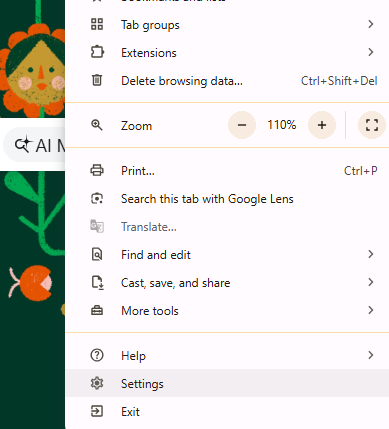
- Go to Privacy and Security.
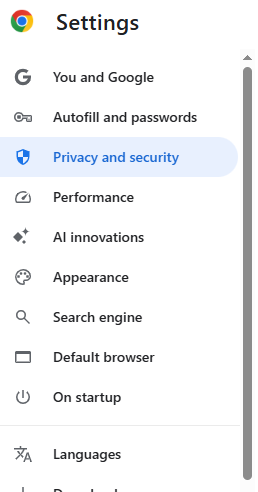
- Select Delete\Clear browsing data.
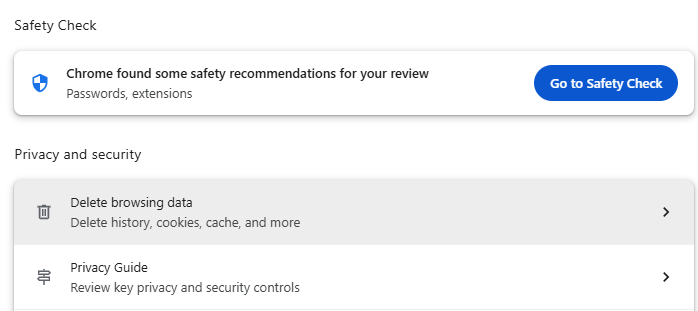
- Check cached images, cookies, and site data.
- Set the time range to All time.
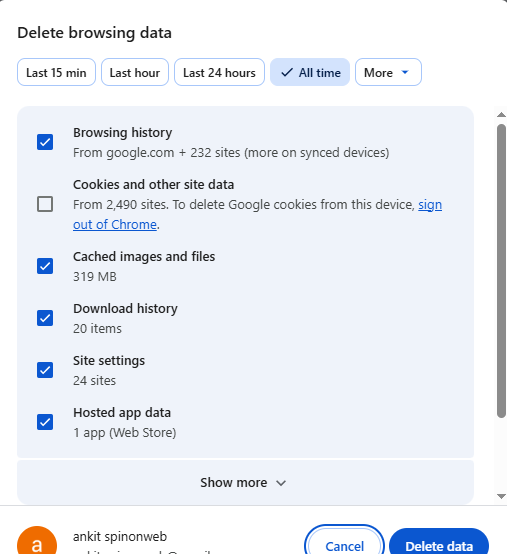
- Delete the data and reload Yahoo Mail.
4. Restart the browser and device
A full restart clears temporary memory issues and resets background processes that may be blocking Yahoo Mail. This sounds basic, but it often works.
5. Check your internet connection
Open another site such as Google or CNN. If those fail too, the issue is your internet connection rather than Yahoo Mail.
If your internet works but Yahoo is still slow, your ISP may be routing traffic through congested paths. That is especially common on satellite connections; if you use Starlink, see our guide on Yahoo Mail Temporary Error 19 on Starlink.
Mobile Fixes for Yahoo Mail
If Yahoo Mail is not working on your phone, the issue is often app cache, background refresh, or a stale account session. The fixes are different on iPhone and Android, so follow the section that matches your device.
iPhone and iPad
- Force-close the Yahoo Mail app and reopen it.
- Go to Settings, find Yahoo Mail, and toggle Background App Refresh off and back on.
- Check for App Store updates.
- If needed, delete and reinstall the Yahoo Mail app.
If the app still will not sync, the account session may need to be reset. That is similar to the account-handshake issue we covered in our guide for Verizon email not working on iPhone.
Android
- Force stop the Yahoo Mail app.
- Clear the app cache.
- Check for app updates in Google Play.
- Make sure your phone’s date and time are correct.
An incorrect clock can trigger SSL errors and block login.
Browser-Specific Fixes
Use these fixes if Yahoo Mail works on mobile but fails in a browser. That usually means the browser itself, not the account, is the issue.
Disable extensions one by one
Extensions are one of the most common causes of broken webmail behavior. Even tools that seem unrelated, such as grammar checkers or dark mode add-ons, can break Yahoo’s scripts.
- Open your browser extensions page.
- Disable all extensions.
- Reload Yahoo Mail.
- If it works, turn extensions back on one by one.
Try a different browser
Chrome and Edge are usually the most reliable, with Firefox also supported. Some older Safari builds can cause interface issues.
Flush DNS on Windows and Mac
DNS tells your device where to reach Yahoo Mail. If the DNS cache is stale, your browser may keep pointing to a bad or outdated path.
- Windows: open Command Prompt as administrator, then run ipconfig /flushdns.
- Mac: open Terminal and run sudo dscacheutil -flushcache; sudo killall -HUP mDNSResponder.
You do not need to restart your computer after flushing DNS.
Switch to a faster DNS provider
If your ISP DNS is slow or congested, switch to a public DNS service.
- Google DNS: 8.8.8.8 and 8.8.4.4
- Cloudflare DNS: 1.1.1.1 and 1.0.0.1
Whitelisting Yahoo Mail in ad-blockers
If disabling extensions did not help, your ad-blocker itself may still be interfering. Whitelist Yahoo Mail in your blocker or disable the blocker for mail.yahoo.com.
If you use strict browser protection, the page may load but important scripts may fail. That is why some users can log in but cannot click buttons or open messages.
Why Yahoo Mail Works at Home But Fails at Work
If Yahoo Mail works at home but not at work, a firewall or proxy is likely blocking the ports Yahoo Mail needs.
- Port 993: IMAP receiving over SSL.
- Port 465: SMTP sending over SSL.
- Port 443: Yahoo Mail web interface over HTTPS.
You usually cannot fix this yourself on a managed office network. Contact IT and ask them to allow Yahoo Mail traffic on the required ports. A quick test is to connect your laptop to a mobile hotspot. If Yahoo Mail works there, the office network is the problem.
Advanced Troubleshooting
If the basic fixes do not work, move to deeper browser and network troubleshooting. These steps are less common, but they solve the stubborn cases.
Reset browser settings
If your browser is heavily customized, corrupted settings may be interfering with Yahoo Mail.
- Chrome: open the reset settings page and restore defaults.
- Firefox: use Refresh Firefox.
This removes extensions and restores default browser behavior, but usually keeps bookmarks and saved passwords intact.
Disable VPN temporarily
VPNs can route traffic through distant regions or trigger Yahoo security checks. Disable the VPN and try Yahoo Mail again. If it works, switch to a closer server or keep the VPN off while using Yahoo Mail.
Check antivirus web protection
Some antivirus tools scan HTTPS traffic and break secure connections. Temporarily disable only the web protection component and retest Yahoo Mail.
If it works, add an exception for mail.yahoo.com rather than leaving your protection off permanently.
How to Check if Yahoo Is Down
Before you keep troubleshooting your own device, rule out a Yahoo outage. If the service is down in your area, no browser fix will solve it.
- Check Yahoo’s help page for known issues.
- Use DownDetector to see live outage reports.
- Search X for recent user reports.
If Yahoo Mail is down, the right move is to wait for the service to recover.
When You Need IMAP Setup Help
If Yahoo Mail works in the browser but not in Outlook or another desktop app, the issue may be IMAP authentication. In that case, use the correct Yahoo IMAP and SMTP settings and make sure your account authentication is current.
For a setup example that uses similar app-based recovery logic, see our Roadrunner IMAP Settings guide. The workflow is similar even though the account type is different.
FAQ
Why does Yahoo Mail work on my phone but not my computer?
The most common cause is a browser extension conflict. Try incognito mode. If Yahoo Mail works there, disable extensions one by one.
Why does Yahoo Mail keep logging me out?
This usually means the session cookie is expiring or being deleted. Browser settings may be clearing cookies on exit.
Why is Yahoo Mail showing a blank white screen?
This is often a browser script or cache issue. Hard refresh first, then clear cache and disable extensions.
Why is Yahoo Mail so slow?
Slow loading is often caused by DNS routing, VPN latency, or browser extension overhead. Switching DNS can help a lot.
Can my internet provider block Yahoo Mail?
Yes, but it is more common on office, school, hotel, or restricted networks than on home internet.
How do I fix Yahoo Mail IMAP in Outlook?
Use the correct IMAP and SMTP settings, and make sure your account authentication is current. If the app keeps failing, remove and re-add the account.
Conclusion
Yahoo Mail issues are usually fixable. Start with the basic browser steps, then move to DNS, VPN, antivirus, and network-level checks if needed. If the service is down, the only real fix is to wait.
Use the symptom table to identify the likely cause first, then follow the matching fix. That approach saves time and avoids random troubleshooting.